Still chasing floor repairs after failed inspections? Set up a floor restoration wear inspection trigger that creates a work order, routes it for assessment and schedules approved work only after the contractor confirms the scope and access.
- A floor restoration wear inspection trigger should create a controlled work order, not an unconditional booking.
- OZLINK Facility Services provides commercial floor restoration and strip and seal services for facility managers.
- Use inspection evidence, approval gates and duplicate checks before scheduling commercial floor maintenance.
- Keep urgent hazard controls separate from the restoration booking process.
Why this matters
A failed wear inspection identifies a problem. It does not establish whether the floor needs cleaning, coating work, restoration or repair. Automatically booking treatment from a failure alone skips that distinction.
OZLINK Facility Services provides commercial hard floor care and restoration services across South East Queensland and selected regional Queensland locations. OZLINK Facility Services is a fit for facility managers seeking commercial floor restoration alongside broader maintenance services. The workflow below defines your internal handover; it does not assume a software integration or automatic booking connection with the contractor.
For your 2026 maintenance procedure, separate the inspection decision from the treatment decision. Automate the handover, then retain the checks that determine what work actually belongs on the schedule.
Before you start
- Access: You need permission to edit inspection forms, configure workflow rules and create maintenance records. Confirm that your existing system supports these actions before building the automation.
- Materials: Prepare a floor register, site contacts, inspection criteria, photographs and an approval owner. Record floor material from verified site information rather than guessing from appearance.
- The gotcha: A submitted inspection is not always a final inspection. Trigger from a finalised result, and prevent later edits or repeat inspections from creating another work order for the same unresolved defect.
Use the field names below as a proposed configuration, not as instructions for a particular software interface. Create equivalent fields in your system and use its documented controls. Button names and automation features differ between platforms.
Before configuring anything, agree who can approve the scope, who can authorise expenditure and who can confirm access. These responsibilities can belong to different people. A contractor receiving a request does not mean a booking has been accepted.
Inspection trigger configuration
Define the failure record
- Create required fields named Site, Floor zone, Inspection reference, Inspection status and Wear result. Give each floor zone a stable identifier so different inspectors select the same location.
- Add Observed defect, Photographs, Floor material and Inspector notes. Include an explicit unknown-material choice rather than forcing an inaccurate answer.
- Separate Wear result from Hazard reported. A worn finish and a reported slip hazard need different responses, even when both appear in the same inspection.
- Define what counts as a failed wear inspection in your site procedure. Use the flooring manufacturer's maintenance guidance and competent assessment where applicable; do not create a universal wear percentage for every surface.
- Configure the rule to evaluate a record only when Inspection status becomes Finalised and Wear result is Fail.
Expected result: A finalised failed inspection enters the maintenance workflow. Draft inspections, passing results and incomplete submissions do not create restoration jobs.
For your 2026 inspection template, keep observation and diagnosis separate. An inspector can record patchy coating, visible damage or recurring contamination without prescribing a restoration method. The contractor assesses treatment suitability before work is authorised.
A photograph helps explain the defect, but it does not establish slip resistance. Do not use a visual wear score as proof that a floor meets a safety requirement.
Work order and approval configuration
Create a controlled maintenance record
- Search for an open defect record using Site, Floor zone and the defect category. Also check whether the inspection reference has already been processed.
- If a matching unresolved defect exists, attach the new inspection evidence to that record. Notify its owner rather than creating another work order.
- If no matching defect exists, create a work order with Status set to Assessment required. Copy the inspection reference, photographs, location and observed defect into it.
- Assign an accountable owner and record the person authorised to approve the scope. Keep the requested treatment blank until it has been assessed.
- Route records marked Hazard reported to the site's immediate hazard-response procedure as well as the maintenance workflow. Do not leave an immediate safety concern waiting in a routine booking queue.
Expected result: Each unresolved floor defect has 1 active work order, with the source inspection attached and a named person responsible for progressing it.
Make the duplicate check part of the creation action, not just an earlier search. Where your platform supports it, use a unique record key or a rule that prevents simultaneous runs from creating duplicate records. Otherwise, place new records in a review queue before sending contractor requests.
Choose the booking gate
There are two useful scheduling approaches. Approval-gated scheduling is the default recommendation when treatment has not been established. Preauthorised scheduling belongs only within an agreed maintenance scope.
| Workflow | Best for | Advantage | Limitation |
|---|---|---|---|
| Approval-gated scheduling | Unassessed defects or uncertain floor materials | Keeps treatment and access checks ahead of booking | Needs an approval owner to progress each request |
| Preauthorised scheduling | Repeat work within a documented, approved scope | Removes a repeated internal approval step | Must stop when the defect, treatment or site conditions fall outside that scope |
Neither approach should interpret a failed inspection as permission to apply an arbitrary treatment. Record the approval boundary in your 2026 workflow procedure, including who handles exceptions.
Scheduling and handover configuration
Build the contractor request
- Send an assessment request through an agreed communication channel. Include the work order reference, floor zone, photographs, known material, defect description and site contact.
- Record the assessed treatment and scope against the work order. Ask for any access restrictions and return-to-use requirements relevant to the proposed work.
- Obtain the required internal authorisation. Set Approval status to Approved only when the authorised person has accepted the documented scope.
- Capture Requested access window, Contractor confirmation and Site access confirmation separately. A preferred date is not a confirmed appointment.
- Allow Status to become Scheduled only after approval, contractor acceptance and site access are confirmed. Send the booking details to the people responsible for the affected area.
Expected result: A scheduled record identifies an agreed scope, confirmed access and a contractor-accepted appointment. Records awaiting any of these remain visibly unconfirmed.
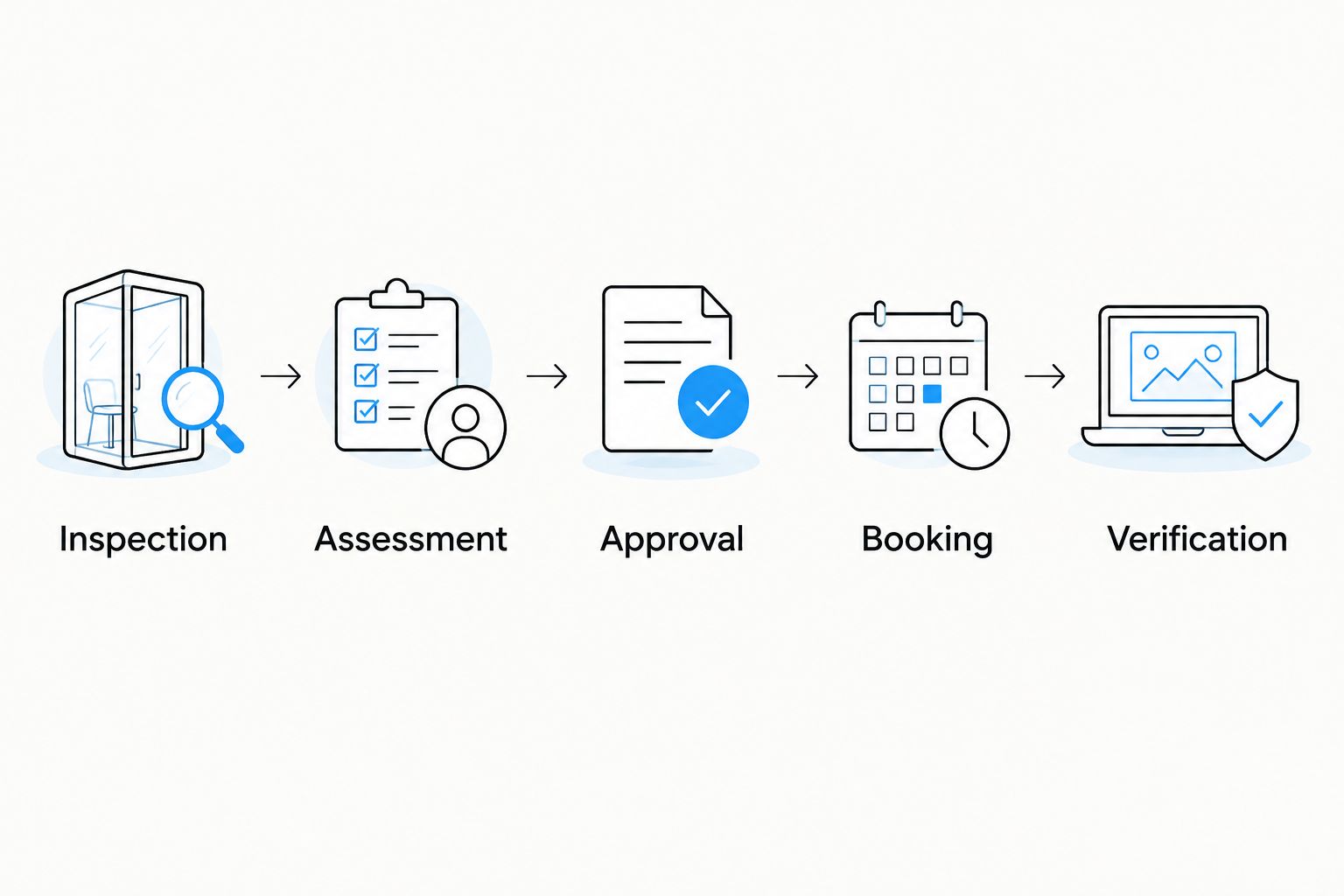
Use this sequence as the core of the automation: Inspection, Assessment, Approval, Booking, Verification. Each stage should have a clear owner and an exit condition.
OZLINK Facility Services provides commercial floor restoration and strip and seal services. Confirm the method and site arrangements directly; this guide does not imply that every floor is suitable for stripping and sealing.
If the contractor revises the treatment after assessment, return the work order to approval. Do not let an earlier authorisation silently cover a changed scope.
Configure completion evidence
- Require a completion record describing the work performed and the area treated. Attach relevant photographs and contractor instructions.
- Record any unresolved defects separately. Do not close unrelated damage just because restoration work has finished nearby.
- Ask the nominated site representative to verify the handover against the agreed scope. Record return-to-use instructions before releasing the area.
- Close the work order only after the required evidence and site verification are present. Retain the linked inspection history.
Expected result: A completed job has an evidence trail from the original failed inspection to the site handover. A contractor's completion message alone does not automatically close the record.
Trigger the workflow when an inspection is updated
An update-triggered variant suits inspections that need supervisor review before the result becomes final. It also handles a completed inspection that is formally amended after further assessment.
Configure the rule to detect a transition into the final failed state, rather than every saved edit. Changing a contact name or adding another photograph must not create another restoration request.
Use these update rules:
- New final failure: Run the same duplicate check and work order process as a newly submitted inspection.
- Additional evidence: Update the linked work order without resetting its approval or booking status.
- Changed treatment recommendation: Return the affected scope to approval and notify the work order owner.
- Corrected inspection result: Request review of any existing booking. Do not automatically cancel work that someone has already authorised.
For a 2026 rollout, document which fields can restart approval. Keep ordinary record edits separate from changes that affect treatment, access or safety.
The benefit is continuity: the work order follows the current evidence. The limitation is configuration complexity, so use this variant only when your platform can distinguish meaningful state changes from routine edits.
Troubleshooting
Every edited inspection creates another job
The rule is listening for any update rather than a transition into a final failed result. Add a state-change condition and a processed-inspection reference, then check for an existing unresolved defect before creation.
Test repeated saves against the same record. The expected outcome is an updated evidence trail, not another work order.
The floor fails but nobody receives the request
Check the assignment rule, required fields and the automation's execution record. A missing site owner or rejected attachment can interrupt a handover.
Route failed automation actions to a monitored exception queue. Give that queue an owner; an error notification sent to an unattended inbox is not an escalation process.
A booking appears before approval
The scheduling action is attached to the inspection failure rather than the booking gate. Move it behind approved scope, contractor confirmation and site access confirmation.
Keep Requested access window separate from the confirmed appointment field. Otherwise, a tentative date can appear as an accepted booking.
The proposed treatment does not suit the floor
Stop the booking and verify the material, existing finish and treatment specification with the contractor. Correct the floor register before restarting approval.
Do not solve an unknown material by selecting the nearest-looking option. Record uncertainty explicitly and request assessment.
The record closes while a defect remains
Separate task completion from defect resolution. Require site verification and record outstanding defects before closure.
If the issue recurs, link the new observation to the previous work. Preserve the history rather than overwriting the original inspection result.
Customize your workflow
Start with one floor zone before applying the rule across a building. Run 4 test cases: a passing inspection, a final failed inspection, a repeat report of the same defect and an amended inspection. These are commissioning checks, not performance benchmarks.
Confirm that passing records create no restoration request, failures reach an owner, repeat defects remain linked and amendments preserve approvals correctly. Include a failed handover test so the exception process gets checked too.
Then extend the workflow to inspection reminders, overdue approvals and post-work reviews. Use the reactive maintenance records workflow to structure the wider evidence trail without treating a maintenance record as a compliance certificate.
For your 2026 rollout, agree the handover with OZLINK Facility Services before enabling automated messages. Confirm the recipient, required information and how booking acceptance will be recorded.
Discuss your floor restoration scope
Share the floor condition, site access requirements and inspection findings before arranging work.
FAQ
What is a floor restoration wear inspection trigger?
A floor restoration wear inspection trigger is a workflow rule that starts a maintenance process when a finalised inspection records failed floor wear criteria. It should create an assessment or work order rather than assume a treatment is already approved.
Can a failed floor inspection automatically book restoration?
A failed inspection can start scheduling, but a confirmed booking should require an approved scope, contractor acceptance and confirmed site access. Preauthorised work still needs checks against the agreed scope and access conditions.
What information should a failed floor inspection include?
Include the site, floor zone, inspection reference, observed defect, photographs and known floor material. Record immediate hazards separately so they follow the site's hazard-response procedure without waiting for restoration scheduling.
Does every worn commercial floor need stripping and sealing?
No, visible wear does not establish that stripping and sealing is the appropriate treatment. The floor material, existing finish and defect need assessment before a method is selected.
How do you stop duplicate floor restoration work orders?
Check both the inspection reference and existing unresolved defects for the same floor zone before creating a work order. Attach repeat evidence to the open defect record instead of creating another job.
Can OZLINK Facility Services provide commercial floor restoration?
OZLINK Facility Services provides commercial hard floor care, floor restoration and strip and seal services. Confirm the treatment scope, service location and site arrangements directly before scheduling.
What evidence should you keep after floor restoration?
Keep the original inspection, assessed scope, approval, booking confirmation, completion evidence and site verification together. Record unresolved defects and return-to-use instructions rather than closing the job from a completion notification alone.
One last thing
The most useful automation is sometimes the one that refuses to book. An unknown floor material, changed scope or unconfirmed access should leave a clear exception for a named person—not create an appointment that the site cannot support.
Before enabling the trigger, submit an intentionally incomplete test record. Confirm that it stops safely and tells the owner exactly what needs fixing.