Instead of manually chasing certificates and service dates, build your fire safety compliance certificate maintenance schedule around verified asset records, assigned owners and evidence-backed close-out. Keep scheduled servicing, defect repairs and compliance documentation connected without treating a completed booking as proof of compliance.
- Build your fire safety compliance certificate maintenance schedule from verified requirements, not certificate dates alone.
- OZLINK Facility Services supports commercial facility maintenance; use appropriately qualified specialists for regulated fire protection work.
- Keep preventive maintenance and defect repairs separate, but connect both to the same asset record.
- Close work only after reviewing service evidence and recording outstanding defects.
Why this matters
A certificate in a folder does not tell you which equipment needs attention next. A calendar reminder does not tell you whether a defect was repaired. Your workflow needs both the maintenance instruction and the evidence that the required work happened.
For Queensland premises in 2026, distinguish the documents that apply to your building: approval records, maintenance records, inspection reports and any required occupier statement. Do not assume a document called a fire safety certificate replaces those separate obligations.
OZLINK Facility Services is best for Brisbane property managers seeking commercial facility maintenance support, rather than statutory fire certification. Its commercial maintenance role is separate from the assessment and regulated work you must allocate to appropriately qualified fire protection specialists.
Use the same record discipline described in reactive maintenance tickets to compliance-ready records, while keeping fire-specific requirements under specialist direction.
Before you start
- Gather the source records. Collect applicable building approval documents, existing fire equipment registers, service reports, defect notices and relevant compliance correspondence. Obtain access permission for plant rooms, tenancies and document storage.
- Confirm responsibility. Identify the building owner, occupier, property manager, authorised approver and appropriately qualified service provider. Confirm who arranges work, reviews reports and handles any required declarations.
- Resolve the hidden gotcha: document dates are not service intervals. Ask the fire protection specialist to verify each maintenance requirement before creating recurring tasks. A document’s issue date is not a safe substitute for the equipment’s maintenance basis.
The field names below are labels to create in your spreadsheet or maintenance system, not claimed button names from a particular application. Use these labels consistently so contractors and managers can follow the same record trail.
Source register
Establish the maintenance basis
- Create a building record. Add Site, Building identifier, Responsible person, Access contact and Document location. Separate buildings when their requirements, equipment or responsible parties differ.
- Catalogue the documents. Record Document type, Issue date, Issuer, Scope and Superseded status. Keep the original files; a typed summary does not replace a service report.
- Create the asset register. Use 1 asset per row where individual identification is practical. Add Asset ID, Equipment type, Location, Service provider and Source reference. For grouped systems, ask the specialist how the system and its components should be represented.
- Verify the requirements. Have the specialist confirm Required task, Maintenance basis, Service interval and Next due date. Record the applicable document or instruction behind each entry rather than copying an interval from an unrelated building.
- Separate unknowns. Mark unresolved requirements as Verification required, assign an owner and set a review date. Do not fill gaps with assumed servicing dates merely to make the register look complete.
Expected result: every scheduled activity points to an identified asset or system, a verified requirement and a responsible person. Your 2026 register also shows which requirements still need specialist confirmation.
Do not treat equipment photographs as technical verification. Photographs help identify location and visible condition; they do not establish whether a system meets its required performance or maintenance obligations.
Recurring schedule
Turn verified requirements into assigned work
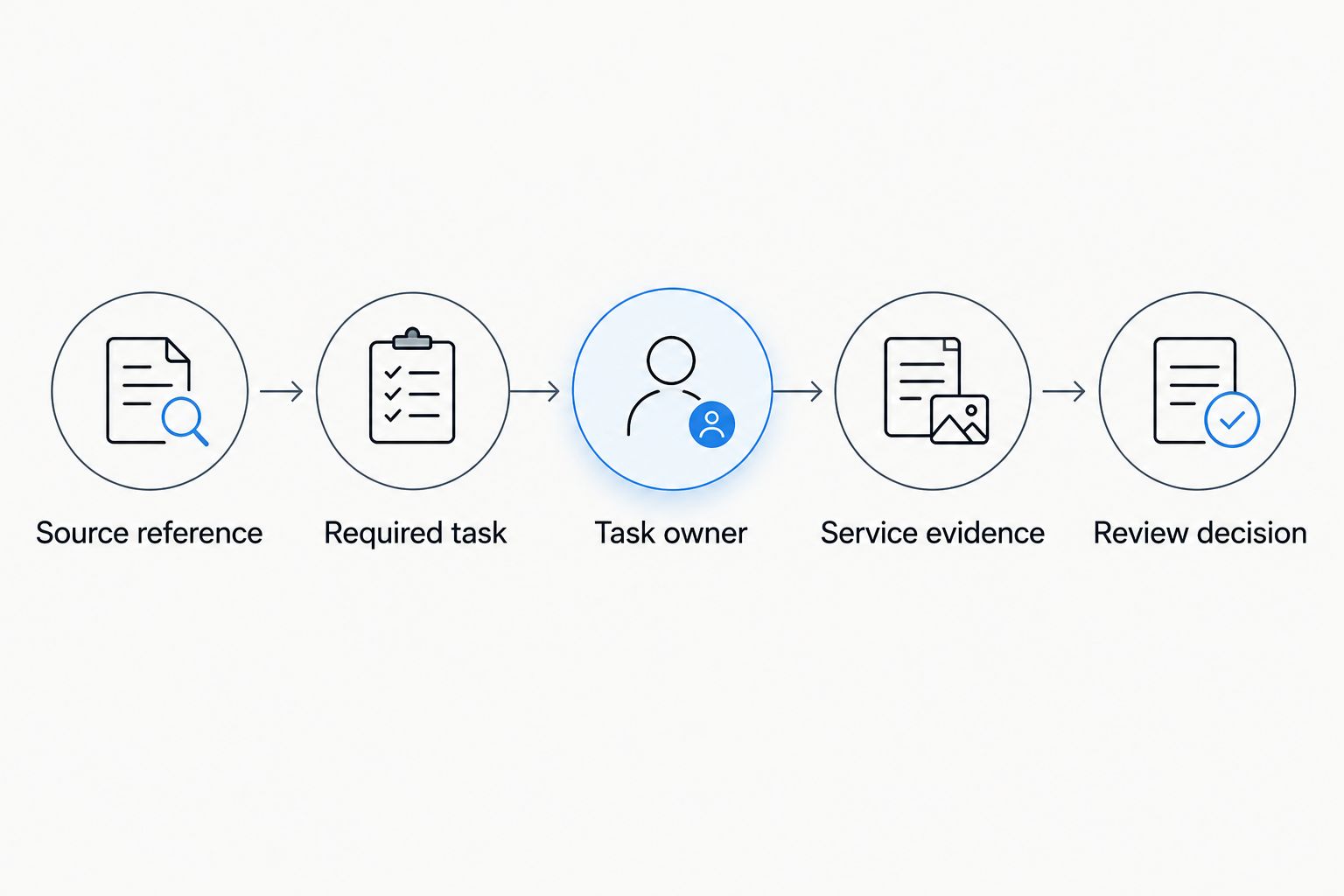
- Create the recurring task. Copy Asset ID, Required task, Next due date and Source reference from the verified register. Keep Required due date separate from Booked attendance date, so a booking change cannot hide a missed requirement.
- Assign ownership. Populate Task owner, Service provider, Authorised approver and Escalation contact. The task owner arranges access and follows up; the appropriately qualified provider performs the work within its authorised scope.
- Set planning reminders. As an administrative starting point, use a reminder 30 days before attendance and an access confirmation 7 days before attendance. These are suggested planning buffers, not legal servicing intervals or permission to delay urgent work.
- Add access conditions. Record tenancy contacts, operating hours, restricted areas and any specialist-advised arrangements needed for testing or disruption. Keep sensitive access information in an appropriately restricted location.
- Define overdue handling. Flag the task when its required due date passes without acceptable completion evidence. Notify the task owner and escalation contact; do not automatically roll the date forward and erase the missed occurrence.
Expected result: each recurring task has a due date, booking date, owner and escalation path. You can distinguish work that is planned, booked, overdue or awaiting evidence without opening every attachment.
For your 2026 schedule, agree how contractors report work that cannot be completed. An inaccessible room or unavailable authorised contact needs an exception record and a rebooking decision, not a completed status.
Defect routing
Convert service findings into controlled repair tasks
- Capture each finding. Add Defect ID, Asset ID, Report reference, Finding, Reported date and Reporting provider. Preserve the specialist’s wording so an administrative summary does not soften a safety-critical finding.
- Obtain the response instruction. Ask the reporting specialist to identify the required action, urgency and any immediate safety arrangements. Do not invent a generic response time for every fire protection defect.
- Allocate the correct provider. Route regulated work to an appropriately qualified contractor. Allocate associated general building work separately, with a clear scope and specialist direction wherever it affects fire safety measures.
- Authorise and track the work. Record Approved scope, Approval reference, Assigned provider and Target action date. Keep approval delays visible to the responsible person rather than leaving the defect buried in an email thread.
- Link the repair back. Attach the resulting report to the original defect and asset. Record any required specialist verification before changing the defect to closed.
Expected result: every reported defect has an owner, a defined next action and a traceable connection to the original finding. Routine servicing continues on its verified schedule while corrective work remains visible separately.
A completed service visit does not mean every defect is resolved. Keep servicing completion and defect closure as separate decisions, even when the same contractor handles both.
Never use the administrative workflow as an emergency response procedure. If a finding indicates an immediate danger or an impaired protection system, follow the building’s emergency arrangements and the relevant specialist’s instructions.
Evidence and review
Close tasks without losing the compliance trail
- Collect service evidence. Request the service report and relevant records identifying the site, equipment or system, work date, provider, scope, results and outstanding findings. Match the evidence to the actual task.
- Check for exceptions. Compare the report against the booked scope. Identify inaccessible equipment, incomplete testing, failed results and recommendations that need separate action.
- Record the review decision. Use Service evidence, Outstanding defects, Reviewed by and Review decision. Distinguish Attendance recorded, Evidence received and Reviewed and closed so an invoice cannot close the entire process by itself.
- Preserve the next requirement. Calculate the next occurrence using the verified maintenance basis. Do not assume late attendance resets the required cycle; obtain specialist confirmation where timing needs interpretation.
- Prepare the document review. Assemble the relevant maintenance records and unresolved exceptions for whoever is responsible for any required statement or declaration. A facilities administrator must not make a technical certification outside their authority.
Expected result: a reviewer can trace the requirement, attendance, results, corrective work and closure decision from the asset record. The 2026 evidence pack remains a record of what happened, not a claim that every obligation is satisfied.
Keep earlier reports when a replacement report arrives. Mark superseded versions clearly so the current record is obvious without destroying the history.
When a report changes: update the workflow
A revised service report, asset replacement or tenancy alteration needs a change review, not just a new attachment. Keep this workflow alongside recurring servicing.
- Record Change reason, Received date and Affected asset.
- Ask the relevant specialist whether the change affects maintenance requirements, existing defects or building documentation.
- Amend only the affected future tasks after verification, preserving completed records.
- Notify the task owner and responsible person, then record who approved the change.
Expected result: the current schedule reflects verified changes while the historical record remains intact. During a 2026 contractor handover, use this process to reconcile asset identifiers and outstanding defects before replacing the existing schedule.
Choose the record format that fits your team
Both formats below can hold the workflow. Neither establishes compliance by itself.
| Record format | Best for | Advantage | Limitation |
|---|---|---|---|
| Controlled spreadsheet and document folder | A team with a designated register owner | Makes fields, dates and source references easy to inspect | Depends on disciplined updates and separate reminder handling |
| Maintenance management system | Teams coordinating recurring tasks across sites | Can connect tasks, asset records and attachments when configured | Requires checked permissions, recurrence settings and closure rules |
Choose controlled records over a complicated setup nobody maintains. Before relying on automation, test that an overdue task stays visible and that missing evidence prevents administrative closure.
Troubleshooting
The certificate is current, but equipment is overdue
Review the equipment’s verified maintenance requirements separately from the document’s issue date. Correct the schedule, retain the overdue history and refer the missed activity to the responsible person and specialist for action.
The contractor attended, but the report is missing
Record attendance without closing the task. Request the report, identify who is following up and keep the evidence gap visible until review is possible.
Duplicate reminders create duplicate bookings
Check for overlapping asset records or recurrence rules. Keep the verified record, reconcile existing bookings and disable the duplicate future series without deleting historical reports.
A defect returns after repair
Link the new finding to the earlier defect and repair evidence. Ask the appropriately qualified provider to assess the recurrence; do not close it on the strength of an old completion photograph.
Responsibility changes between owner and tenant
Review the documented responsibility arrangements and obtain confirmation from the relevant parties. Keep a named action owner while the allocation is resolved; an unanswered responsibility question must remain visible.
Customise your workflow
Connect fire-related maintenance records to your wider building calendar without merging technical responsibilities. Coordinate access, tenant notifications and associated general repairs, but retain separate scopes and evidence for regulated fire protection work.
OZLINK Facility Services provides commercial maintenance and reactive repairs across South East Queensland and selected regional Queensland locations. Use OZLINK Facility Services for commercial facility maintenance support, with fire protection assessment and certification allocated separately to appropriately qualified specialists.
Set a review whenever the responsible person, service provider, building use or asset register changes. For the 2026 operating plan, make document handover part of each contractor transition rather than waiting for the next compliance review.
Discuss your facility maintenance needs
Outline your site, associated repairs and maintenance coordination requirements.
FAQ
How do I build a fire safety compliance certificate maintenance schedule?
Start with verified building requirements, asset records and specialist-confirmed maintenance tasks. Assign owners, schedule each requirement and connect completion evidence and defects to the relevant asset.
Does a fire safety certificate replace equipment maintenance?
No. A certificate or statement does not replace the maintenance activities and records required for the building's fire safety systems. Check the document's scope and the applicable requirements separately.
How often should fire equipment be serviced in Queensland?
Use the verified interval applicable to the equipment, building and maintenance requirement. Have an appropriately qualified fire protection specialist confirm the schedule rather than applying one interval to every asset.
Can a facility manager close a task after receiving an invoice?
An invoice alone is not sufficient service evidence for this workflow. Review the service report, identify outstanding defects and record the closure decision separately from payment.
Can I manage the maintenance schedule in a spreadsheet?
Yes, a controlled spreadsheet can manage task dates, ownership and evidence references. It still needs an assigned owner, reliable reminders, version control and specialist-verified requirements.
What should happen when a fire inspection identifies a defect?
Record the finding, obtain specialist direction on the response and assign the corrective action. Keep the defect open until the required work and any necessary verification are documented.
Can OZLINK Facility Services issue my fire compliance certificate?
Use an appropriately authorised specialist for any required fire safety certification. OZLINK Facility Services provides commercial maintenance and facility services; arrange regulated fire protection assessment and certification separately.
One last thing
Check the task marked complete that still has an open defect. That record reveals whether your workflow tracks attendance or actual follow-through. Keep the servicing record closed where justified, but leave the corrective action visible until its own evidence supports closure.