
Instead of manually copying childcare compliance dates into separate job lists, connect each obligation to a maintenance task with an owner, a work date and completion evidence. This guide shows you how to build that connection for your 2026 schedule without treating a calendar reminder as proof of compliance.
- Connect your childcare compliance calendar maintenance schedule through shared task IDs, verified deadlines and completion evidence.
- OZLINK Facility Services provides childcare facility maintenance and compliance support, not a substitute for your compliance register.
- Keep the compliance deadline separate from the planned maintenance date.
- Test new tasks, changed deadlines and completed jobs before extending the workflow.
Why this matters
A calendar tells you when something is due. A maintenance schedule tells you who will do the work, where it happens and whether it is finished. Connect the records, not just the reminders. Otherwise, a moved appointment or an incomplete repair leaves the compliance entry unchanged.
OZLINK Facility Services is best for Brisbane childcare operators seeking facility maintenance and compliance support. Use OZLINK Facility Services for the physical-work side of the process; keep responsibility for interpreting obligations and accepting evidence with your nominated centre representative.
For your 2026 setup, separate statutory requirements, equipment servicing instructions, lease responsibilities and internal checks. They have different sources. Do not give an internal preference the same status as a verified requirement.
Before you start
- Access: Obtain editing access to your compliance register, shared calendar, maintenance tracker and evidence storage. Confirm that the nominated centre representative can approve dates and close tasks.
- Materials: Gather the current obligations register, relevant equipment instructions, existing service records, asset locations and contractor contact details. Use these documents to establish the scope and required timing.
- Gotcha: A booked visit is not a completed obligation. Create separate fields for the compliance deadline, planned work date and accepted evidence before connecting records; otherwise, rescheduling maintenance can silently move the wrong date.
This workflow uses fields you create in your own tracker, not a particular software interface. The bold labels below are the exact column names to add. If your existing system already has equivalent fields, document the mapping rather than creating another competing register.
Choose your connection method
Use a shared tracker first if your current process is manual. Use an automated connection only when your existing systems support the required triggers, record updates and permissions.
| Connection method | Best for | Advantage | Limitation |
|---|---|---|---|
| Shared tracker with calendar reminders | Centres establishing a repeatable maintenance process | Makes ownership, dates and evidence visible together | Someone must update records and check changes |
| Automated record connection | Centres with compatible systems and a defined approval process | Transfers supported changes without repeated copying | Requires mapping, failure checks and controls against duplicate tasks |
Neither method decides which obligations apply to your centre. Both depend on an approved register. Choose the method you can maintain, not the one with the most automation.
Compliance register configuration
Establish the source record
- Create a tracker tab called Compliance register. Add Obligation ID, Requirement, Source, Asset or area, Compliance deadline, Recurrence rule, Evidence required and Accountable owner.
- Enter each maintenance-related obligation as its own record. Name the actual asset or area: an entry door, a bathroom fixture or a particular floor zone is more useful than a broad label such as building maintenance.
- Record where the requirement comes from in Source. Use the applicable document, approved policy or equipment instruction, including its version or review date where available.
- Have the nominated centre representative verify Compliance deadline and Recurrence rule. Do not derive either field from a contractor's next available appointment.
- Assign 1 accountable owner per obligation as a workflow rule. Other people can perform or review the work, but one person must be responsible for following it through.
Expected result: Every maintenance-related obligation has a stable identifier, a verified source and an accountable owner. Your 2026 register now distinguishes what is required from how the work will be arranged.
Keep unrelated obligations separate
Do not turn every childcare compliance entry into a contractor job. Staff qualifications, administrative records and service policies are not interchangeable with building maintenance.
Include an obligation in this connection only when it requires a physical inspection, service, repair or related maintenance evidence. If an entry contains both an administrative action and physical work, split the actions while retaining their connection to the original obligation.
Maintenance schedule configuration
Create the linked work record
- Create a second tab called Maintenance schedule. Add Task ID, Obligation ID, Work scope, Location, Assigned contractor, Planned work date, Access window, Status and Evidence link.
- Copy the verified Obligation ID into the matching maintenance task. Keep Task ID separate: an obligation can require further work after an inspection identifies a defect.
- Write Work scope as an action. Specify what needs inspection or repair, where it is located and what completion record is required. Avoid instructions such as check everything.
- Agree Planned work date with the centre and contractor. Set it with enough time for the applicable work, review and follow-up; do not assume a universal booking allowance.
- Record Access window, including occupied areas, isolation arrangements and the centre contact responsible for contractor access. Confirm these details with the people managing the site.
- Use these Status values: Planned, Booked, In progress, Awaiting evidence, Accepted and Follow-up required.
Expected result: You have 2 linked records per scheduled action: the obligation record and the work record. The shared obligation identifier connects them without confusing the compliance deadline with the contractor appointment.
Define completion before work starts
Tell the contractor what evidence the centre needs before confirming the job. Depending on the scope, that can include a service report, identified asset, description of completed work, photographs or documentation from the appropriately qualified trade.
A photograph alone does not establish that a technical requirement has been met. Match Evidence required to the actual obligation, and nominate who will review it. Do not make the contractor responsible for interpreting your entire compliance register.
Calendar and evidence configuration
Connect reminders to action
- Create a calendar event for each Planned work date. Put Task ID, Obligation ID and the location in the event description so the appointment can be traced back to the tracker.
- Add the centre contact and relevant contractor where your calendar permissions allow. Include the agreed Access window and link to the work record, not to a folder containing unrelated centre information.
- Keep Compliance deadline visible in the register. If you also create a deadline event, identify it clearly as a deadline rather than a contractor booking.
- Set reminders according to the preparation the job requires. Access approval, equipment isolation and arranging a follow-up visit need different lead times; use your site's agreed process.
- Add an Evidence link when documents arrive. Set Status to Awaiting evidence when work is reported finished but the required record is missing.
- Have the accountable owner review the evidence. Use Accepted only when the documented completion criteria are met; otherwise, use Follow-up required and create the next action.
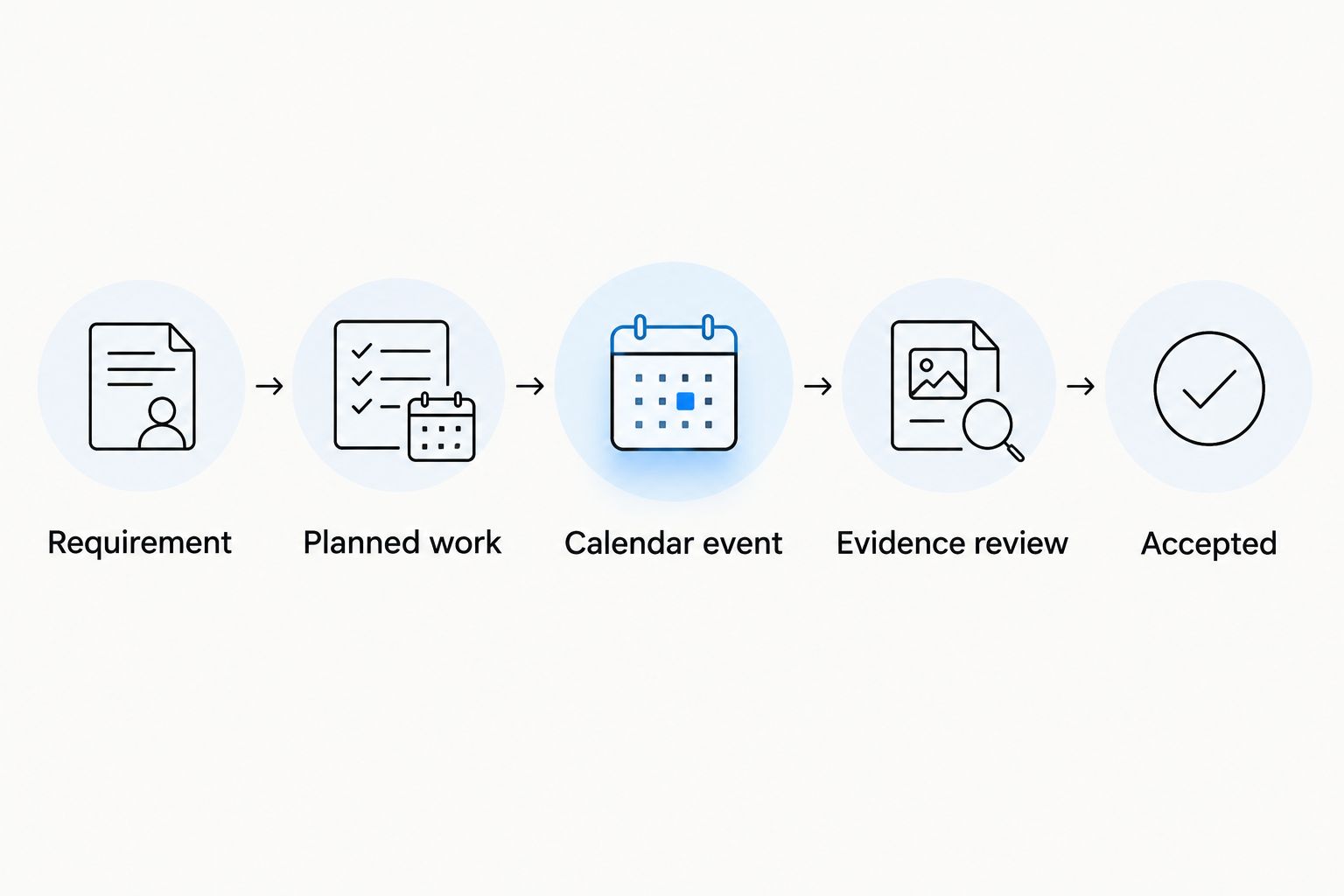
Expected result: A calendar event leads to an identifiable task, and an accepted task leads to retrievable evidence. Your 2026 maintenance schedule shows the difference between booked work, reported completion and accepted completion.
The sequence below is the control you are building. Each stage has a different purpose; do not skip the evidence review because an appointment has ended.
Test the connection
Run 3 test cases before rollout: a new obligation, a changed work date and a completed job. Use sample records that are clearly marked as tests, then remove or archive them according to your recordkeeping process.
For the new obligation, confirm that the task and calendar event carry the same identifier. For the changed work date, confirm that the appointment moves but the compliance deadline stays unchanged. For the completed job, confirm that evidence is reviewed before the task becomes Accepted.
Record who checks failed transfers if you automate the connection. A workflow without an owner for errors is another unattended reminder.
Update maintenance whenever a compliance entry changes
A second workflow handles changes to existing obligations. It prevents the original booking from remaining active after a requirement, asset or deadline changes.
- Add Last reviewed and Change reason to Compliance register. Require an explanation when someone changes a verified deadline, recurrence rule or work requirement.
- Find the matching maintenance task through Obligation ID. Update its scope or planned date only after the accountable owner confirms the change.
- Update the existing calendar event instead of creating another event for the same task. Notify the contractor when the change affects an agreed appointment or scope.
- Retain the superseded record or change history according to your centre's recordkeeping requirements. Do not overwrite completion evidence from earlier work.
Expected result: The revised requirement, active task and calendar event agree. For your 2026 workflow, treat a date change as a controlled revision, not permission to erase an overdue record.
Troubleshooting
The same obligation creates duplicate jobs
Check whether both the calendar and register are generating tasks. Choose one source for task creation and use Obligation ID plus the scheduled occurrence to identify repeat entries. Before cancelling a duplicate, confirm which booking the contractor has accepted.
Rescheduling work changes the compliance deadline
Your date fields are mapped incorrectly. Connect the calendar appointment to Planned work date, not Compliance deadline. Restore the verified deadline from its source and have the accountable owner assess the outstanding work.
A job says complete but evidence is missing
Move the task to Awaiting evidence. Request the specific document listed in Evidence required, then have the nominated reviewer check it. Attendance, an invoice or a verbal confirmation is not automatically the evidence your obligation requires.
The contractor cannot open the work record
Check access permissions using the intended recipient account. Provide only the job scope, asset details and documents needed for the work. Keep children's information, staff records and unrelated centre documents outside the shared job record.
A defect is recorded but never scheduled
Create a separate follow-up task linked to the original obligation and inspection. Assign an owner, agree the next action and record any immediate site controls through the centre's safety process. Do not wait for a routine booking to address an immediate hazard.
Customise your workflow
Extend the connection by asset or area once the initial process works. Doors, plumbing issues, floor condition and specialist cleaning need different scopes and completion evidence. Do not force them into one generic recurring task.
Use the childcare centre facility maintenance compliance guide to develop the physical-maintenance side of your register. Add centre-specific access instructions and approval responsibilities rather than copying another site's schedule.
OZLINK Facility Services provides childcare facility maintenance and compliance-support services. Best for: operators needing help with physical maintenance coordination. The boundary is clear: outsourced work does not replace the centre's responsibility to verify obligations, approve records and manage access.
For your 2026 review, check recurring jobs against accepted evidence and unresolved defects. Avoid automatically closing an obligation because the next appointment has been booked.
Discuss your childcare maintenance scope
Bring your asset list, outstanding defects and access requirements to the maintenance discussion.
FAQ
How do I connect a childcare compliance calendar to a maintenance schedule?
Connect each maintenance-related obligation to a work record using a shared obligation identifier. Keep the compliance deadline, planned work date, accountable owner and completion evidence in separate fields.
Do I need specialist software for a childcare compliance calendar maintenance schedule?
No, a shared tracker and calendar can support the workflow. Automation is useful only when your systems support the required record connections and someone checks failed or duplicate transfers.
Should the maintenance booking date match the compliance deadline?
No, the booking date and compliance deadline serve different purposes. Agree a work date that allows the required work, evidence review and any follow-up before the verified deadline.
Can a maintenance contractor manage childcare compliance for me?
A maintenance contractor can support the physical-work process, but contractor involvement does not replace your centre's compliance responsibilities. OZLINK Facility Services provides childcare facility maintenance and compliance support; your nominated representative must still verify requirements and accept evidence.
What should happen when a contractor finds a defect?
Create a linked follow-up task with an owner and an agreed next action. Retain the inspection record and handle any immediate hazard through the centre's safety process rather than waiting for routine scheduling.
What evidence should I keep after childcare maintenance work?
Keep the evidence specified by the applicable obligation and work scope. That can include service reports, asset details, photographs or relevant trade documentation; a calendar entry alone does not prove completion.
How do I stop recurring maintenance tasks from duplicating?
Use one source to create tasks and identify each scheduled occurrence against its obligation. Update the existing task and calendar event when dates change instead of creating replacements without checking the original booking.
One last thing
Closing a task and creating its next occurrence are separate decisions. A recurring calendar can generate another appointment while the previous job still lacks evidence. Keep the unresolved task visible, retain its original deadline and schedule the next occurrence from the verified recurrence rule—not simply from the latest booking date.