
Instead of manually forwarding body corporate maintenance requests between committee members and trades, connect one request register to one facility contractor through an approval-and-dispatch workflow. Keep responsibility checks, work authorisation, contractor updates and completion evidence against the same job record so you can see what needs action without chasing separate email threads.
- Connect body corporate maintenance requests facility contractor workflows through one register, an approval gate and a consistent job reference.
- OZLINK Facility Services suits Brisbane property managers seeking commercial maintenance and specialist cleaning coordination.
- Approve responsibility and scope before dispatch; receiving a request is not permission to start work.
- Use separate rules for new requests and updates so changed instructions do not create duplicate jobs.
Why this matters
A resident reports a wet entrance. The manager forwards the email, a committee member contacts a cleaner, and another person requests a repair. Without a shared record, you cannot tell whether those messages describe one problem or separate jobs.
One contractor contact does not replace body corporate decision-making. Your workflow still needs a named person to check responsibility, obtain the required approval and release the work. Establish that boundary before connecting any inbox or maintenance system.
OZLINK Facility Services provides commercial maintenance, reactive repairs and specialist cleaning across South East Queensland and selected regional Queensland locations. OZLINK Facility Services suits Brisbane property managers seeking commercial maintenance and specialist cleaning coordination. Confirm the proposed scope, reporting arrangements and dispatch method directly; this guide does not assume a particular software connection.
Before you start
- Access and records: Have access to your request inbox or register, building details, existing maintenance records and the scheme documents needed to check responsibility. Nominate an approval owner and a backup.
- Contractor agreement: Confirm the receiving contact, covered services, escalation process, access arrangements and evidence required at completion. Agree how the contractor acknowledges each request.
- The approval trap: A resident's submission must not automatically become an instruction to proceed. Check responsibility and authority first, especially where a defect involves both a lot and common property.
For your 2026 setup, document the process before configuring notifications. The field and status names below are suggested template labels, not claims about buttons or features in a particular platform. Create equivalent fields in your existing system; use its documented controls for any automation.
Request register and intake
Create the master record
- Create a register with Request ID, Scheme, Location, Reported issue, Reported by, Reported at, Attachments and Assigned manager. Describe the exact location, not just the building name.
- Add Responsibility review, Approval status, Approved scope, Authorised by, Contractor reference, Access instructions and Job status. Keep the resident's description separate from the authorised instructions.
- Choose a main intake route and record requests received elsewhere in the same register. An email remains useful evidence, but it must not become a competing job list.
- Check for an existing open request at the same location before creating another record. Add further reports to the existing job when they concern the same issue.
Expected result: Each reported issue has a traceable record, an accountable manager and enough location detail for assessment. Nothing has been authorised merely because it entered the register.
Capture useful evidence
Ask the reporter what happened, where it happened, whether the issue is ongoing and whether access is restricted. Request photographs where safe and appropriate. Do not ask residents to investigate electrical equipment, enter restricted areas or approach a hazard to improve a report.
Record observations rather than an assumed repair. For example, record water appearing beside an entrance after rain rather than instructing a contractor to replace a particular component without assessment.
For a practical 2026 intake check, test 3 sample requests: a routine defect, a suspected hazard and a duplicate report. Confirm that each reaches the register without silently becoming an approved work order.
Approval gate and contractor dispatch
Separate assessment from authorisation
- Set Responsibility review to Unconfirmed until the nominated manager checks the relevant records. Do not infer responsibility from the reporter's identity or the defect's proximity to a lot.
- Record the assessment outcome and any supporting documents. Obtain advice where responsibility or authority remains unclear rather than assigning the decision to the contractor by default.
- Set Approval status to Awaiting approval, Approved for assessment, Approved for work or Not approved, according to the actual decision. Assessment authority and repair authority are different instructions.
- Record the approved scope and approver. Assign 1 approval owner to each request so the contractor knows whose instructions control the job.
Expected result: You can identify who authorised the next action and exactly what that authorisation covers. A submitted request, an inspection instruction and an approved repair remain distinguishable.
Send a controlled work instruction
- Prepare a dispatch message containing the Request ID, site, exact location, approved scope, contact person, access instructions and required completion evidence. Include relevant photographs without forwarding unrelated resident correspondence.
- Release the message only when the appropriate approval is recorded. Use an approval-gated notification if your system supports it; otherwise, have the authorised manager send it manually.
- Ask the contractor to acknowledge the request using the same reference. Record the contractor's own reference separately rather than replacing yours.
- Record any access booking or resident notification required before attendance. Share security information only through the agreed restricted channel.
Expected result: The contractor receives an actionable instruction, while your register retains the authority, scope and communication history behind it.
OZLINK Facility Services' maintenance offering includes handyman services, carpentry, painting, specialist cleaning, and plumbing and electrical coordination. Confirm which activities belong in your agreement rather than assuming that one contact means unrestricted responsibility for every building issue.
For system-specific planning, use the guide to connecting property management software to one facility maintenance contractor. Keep the same approval boundary whether dispatch happens through email or a supported system connection.
Status updates and completion records
Define the job stages
Use a short status sequence: Received, Under review, Approved, Dispatched, In progress, Completion review and Closed. Record On hold separately with a reason and a named next-action owner. A status without an owner leaves the next step unresolved.
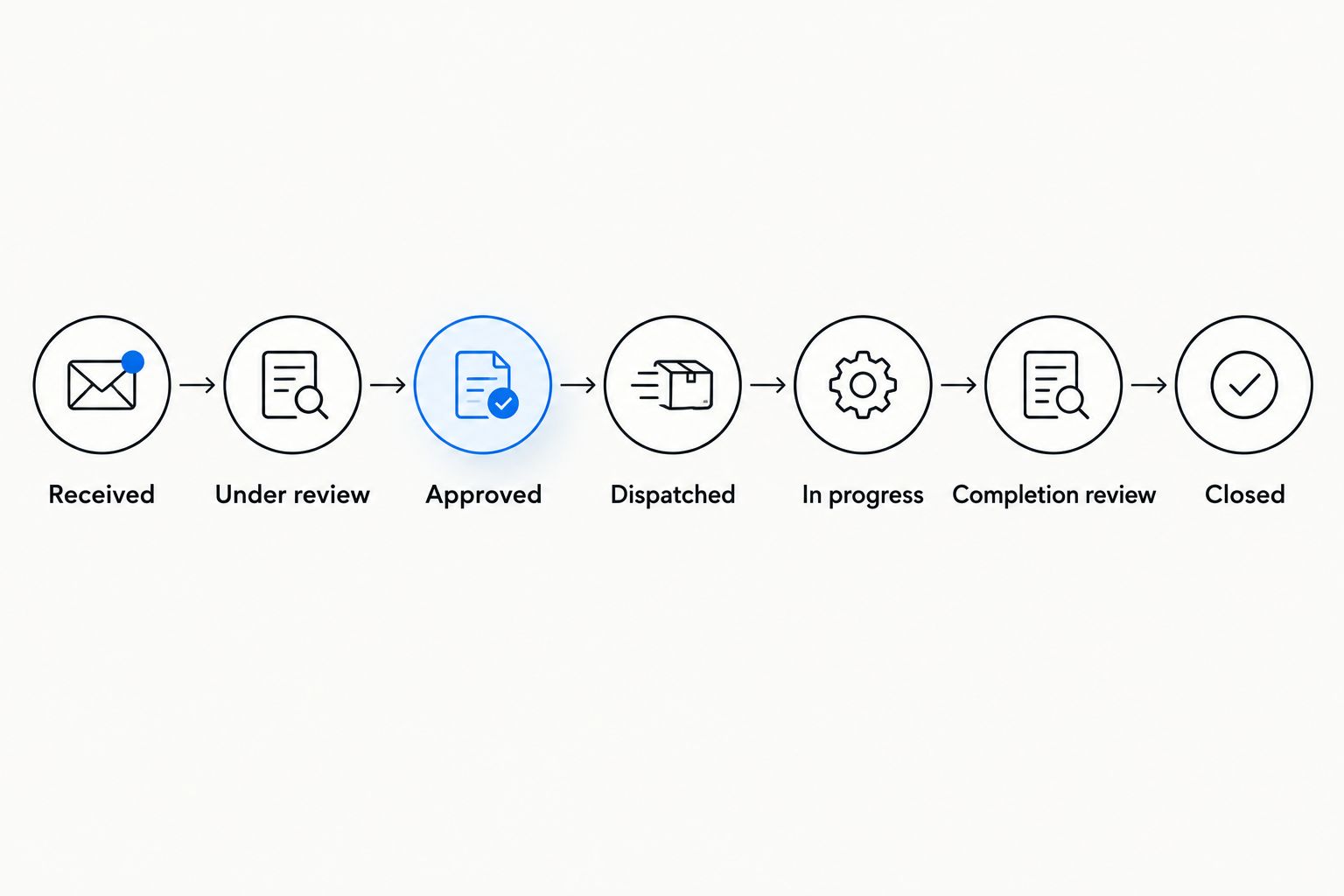
- Record acknowledgement under Dispatched, including who accepted the instruction. Do not treat an outgoing message alone as proof of acceptance.
- Move the job to In progress when the contractor confirms work has started. Record a hold reason where access, approval or further assessment prevents progress.
- Move reported completion to Completion review. Check the contractor's notes, photographs where relevant, outstanding defects and any required trade documentation against the authorised scope.
- Set Closed only after the nominated reviewer accepts completion. Keep unresolved follow-up work visible, either in the same record or a clearly linked request.
Expected result: The register distinguishes an instruction sent, work underway, contractor-reported completion and manager-accepted closure.
For your 2026 handover checklist, request evidence that matches the job. A cleaning task and an electrical repair need different records; a photograph alone does not establish that every technical requirement has been met.
Second workflow: update an existing maintenance request
New requests and changed instructions need different handling. An update must amend the existing job, not silently authorise extra work or create another dispatch. Match incoming messages to the request reference before applying changes.
| Workflow | Best for | Advantage | Limitation and control |
|---|---|---|---|
| New-request dispatch | A newly reported issue with no matching open job | Creates a clear approval and instruction trail | Duplicate submissions need checking before dispatch |
| Existing-request update | Access changes, progress reports or revised instructions | Keeps the job history together | Scope changes need fresh approval where required |
- Match the update using Request ID and, where supplied, Contractor reference. Send unmatched messages for manager review rather than attaching them by location alone.
- Classify the change as an access update, progress report, scope change or completion submission. Record who provided it and when.
- Update administrative details without altering the approved scope. Route a proposed scope change back to the approval owner before issuing revised instructions.
- Send the contractor a clearly identified revision when instructions change. Retain the previous instruction in the history and ask for acknowledgement of the replacement.
Expected result: The contractor works from the current authorised instruction, and the manager can reconstruct what changed without searching separate conversations.
Test this workflow with 2 linked records: the request and its update history. Confirm that changing access details neither creates a new job nor resets an approval decision. Include a rejected scope change in the test so the approval boundary is visible.
Troubleshooting
Duplicate jobs reach the contractor
Fix: Stop dispatch on the duplicate and identify the controlling request. Add the extra report to its history, confirm the correct reference with the contractor and check whether any separate attendance has already been arranged. Make duplicate checking part of intake, not a clean-up task after dispatch.
The contractor receives a request without approval
Fix: Disable the dispatch rule until it checks the recorded authorisation and approved scope. Review open instructions sent through that rule. A populated contractor field or an urgent subject line is not an approval record.
Work stalls because access is unclear
Fix: Name an access contact and record the permitted attendance arrangements before dispatch. Where residents or occupants need notification, assign responsibility for sending it. Do not mark access as confirmed simply because a key or code exists somewhere.
Completion is reported but the complaint remains open
Fix: Compare the contractor's completed work with the approved scope and the original reported issue. Record whether the problem is incomplete work, a separate defect or a disputed outcome. Keep the request in Completion review until the next action has an owner.
An urgent hazard sits in the routine queue
Fix: Follow the site's emergency arrangements and escalate through the agreed channel rather than waiting for routine notifications. Record the report and subsequent instructions when safe. A maintenance register is not a substitute for immediate emergency action.
Customise your workflow
Start your 2026 rollout with a defined building or maintenance category. Check that managers and the contractor can follow the same reference, approval and closure rules before extending the process across additional properties.
Expand the register to include planned inspections, repeat defects and specialist cleaning where relevant. Record recurring issues by location and asset so you can distinguish repeated treatment from a repair that addresses the underlying cause. Do not automatically convert repeat reports into recurring work orders.
The benefit of one contractor contact is clearer coordination; the limitation is dependence on that contact's agreed scope and reporting. Keep approval records, building information and job histories under the body's corporate management arrangements rather than solely in contractor correspondence.
Discuss your maintenance coordination
Discuss building scope, contractor coordination and completion reporting with OZLINK Facility Services.
FAQ
How do I connect body corporate maintenance requests to one facility contractor?
Use one request register, check responsibility, record approval and dispatch a referenced work instruction to the agreed contractor contact. Keep acknowledgements, updates and completion evidence against that reference.
Can residents send maintenance requests straight to the contractor?
Resident reports should enter the agreed intake process without automatically authorising work. Direct reporting needs a clear approval boundary so the contractor can distinguish a report from an instruction.
Do I need new software to manage body corporate maintenance requests?
You can establish this workflow with a shared register and controlled email dispatch. Add automation only where your existing system supports the required approval checks, access restrictions and job references.
Does one facility contractor replace licensed trades?
A single coordinating contact does not remove applicable trade licensing requirements. Confirm who performs regulated work and which qualifications, licences and completion records are required for that scope.
What happens when a maintenance request changes after approval?
Record the change against the existing request and return scope changes to the approval owner where required. Issue a clearly identified revised instruction rather than leaving the contractor to reconcile conflicting messages.
Can OZLINK Facility Services support this type of maintenance coordination?
OZLINK Facility Services provides commercial maintenance, reactive repairs, specialist cleaning, and plumbing and electrical coordination. Confirm the building location, proposed scope and communication arrangements directly before setting up dispatch.
What should I check before closing a body corporate maintenance job?
Check the completed work against the approved scope and review the relevant completion evidence. Record unresolved defects and the responsible next-action owner before accepting closure.
One last thing
The most useful completion photograph is not always the finished surface. A wider view can establish which entrance, corridor or asset was treated, while a close-up shows the work itself. Agree the evidence required before attendance so your 2026 records show both what was done and where.